

The default is one alert when a turn genuinely ends. These are the switches that change that behaviour, and when each one is worth flipping.
Before you start
- Agent Island installed with notifications allowed
- At least one coding session you can run
1. Find the switches
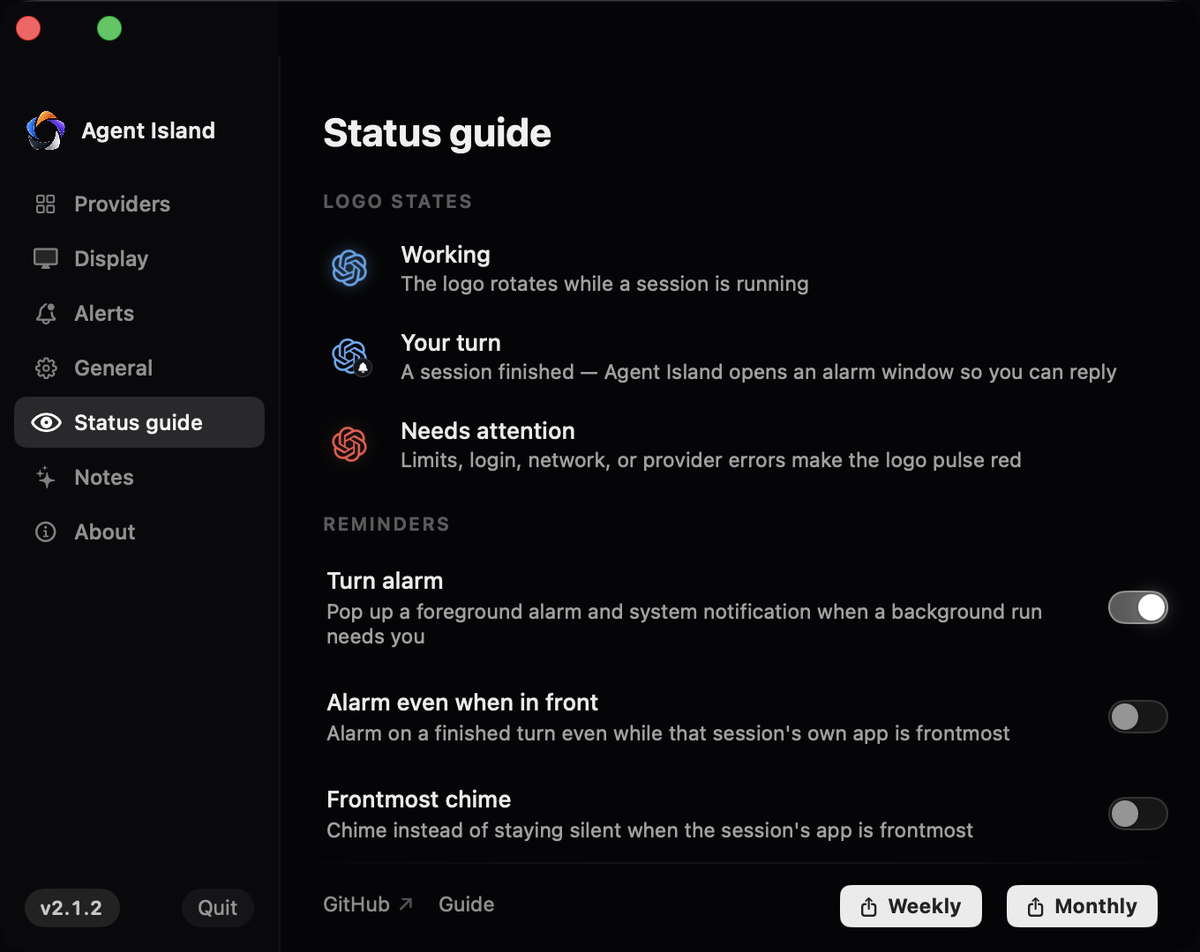
Open Settings → Status guide. The logo-state legend is at the top; the reminder switches are below it.
2. Turn alarm
The master switch. On by default: a foreground alarm window plus a system notification when a background run needs you. Turn it off and the island still shows state, it just stops speaking.
3. Alarm even when in front
Off by default, and that default is deliberate: if you are already looking at the session's own app, the alarm holds and fires the moment you switch away. Switch this on if you want the alarm regardless.
4. Frontmost chime
The middle ground: instead of a full alarm while that app is frontmost, just chime. Only available while Alarm even when in front is off.
5. Show thread details
Controls whether the alarm names the session and project. Turn it off on a shared screen and the alert will only say that a background coding session finished a turn.
6. Alarm sound
Switch the sound on and expand the picker to choose a tone or point at your own audio file, with its own volume. Radar is the default.
7. Return with Open thread
When the alarm fires, Open thread takes you back to the exact session that finished — the session, not just the app.
If it does not work
Check notification permission first, then Turn alarm. Then confirm the session is recent: one idle past the attention window is treated as finished.
Alarm even when in front is on. Switch it off and it will hold until you switch away.
Turn off Show thread details.
Usually replayed session records. Restart to rebuild the index and note whether the session was resumed from an archive.